



 Back to index
Rounding the total without VAT on invoices
On invoices, the unit price is the only value that may carry more than two decimals. Every other value (the total without VAT, the VAT and the total) is shown with two.
How these values are rounded
Rounding may be needed when the total without VAT or the VAT is calculated. The rule is the same for both: the value is rounded to the nearest one.
For example:
- 6.8849 is closer to 6.88 than to 6.89, so it is rounded down to 6.88
- 1.3251 is closer to 1.33 than to 1.32, so it is rounded up to 1.33
And when a value is exactly halfway?
That is, when the last two of four decimals are 5 and 0. Is 1.3250 rounded down to 1.32 or up to 1.33?
Either is correct: whether a value that is exactly halfway is rounded up or down is your choice.
A 0.01 difference between the line total and the invoice total
This can happen when you start an invoice line by typing its total, and let the application work out the unit price, instead of typing the unit price.
The application then calculates the unit price and the VAT from that total. By default it rounds values that are exactly halfway up. If the unit price that comes out ends exactly halfway, the total without VAT is rounded up, and the invoice total ends up 0.01 higher than the total you typed. With several such lines, the difference adds up.
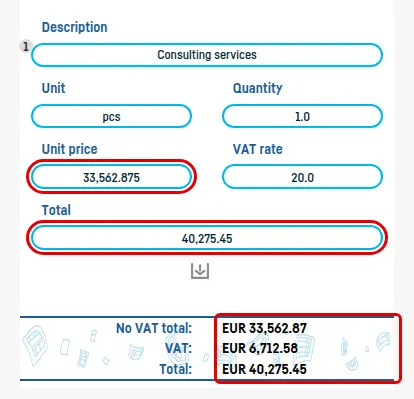
An example, at a VAT rate of 20%: you type a line total of 40,275.45. The unit price works out to 33,562.875, exactly halfway. Rounded up, the total without VAT is 33,562.88, the VAT 6,712.58 and the invoice total 40,275.46: one cent more than you typed.
How to fix it
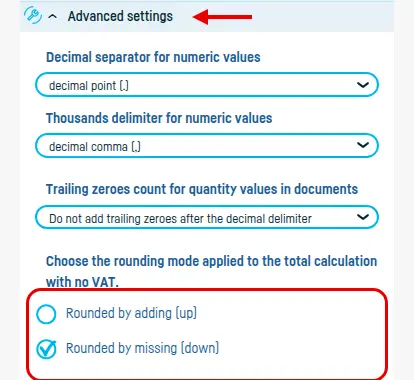
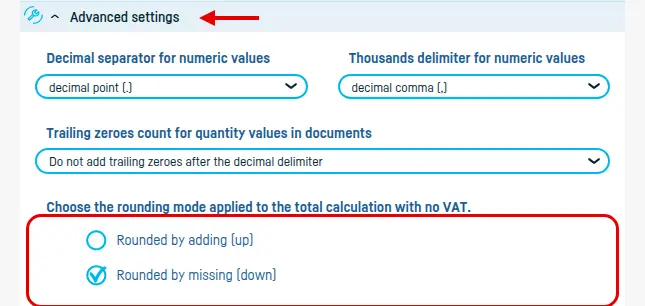
In the invoice form, open Advanced settings and, under Choose the rounding mode applied to the total calculation with no VAT, switch from Rounded by adding (up) to Rounded by missing (down). Select it before you enter the line.
The total without VAT is now rounded down to 33,562.87, and the invoice total is the 40,275.45 you typed:

The VAT formulas
The application does these calculations for you; all it needs is the VAT rate. For reference, at a rate of 20%:
VAT on a price without VAT
Take a unit price of 10.00 without VAT.
VAT: price without VAT × 0.20 = 10.00 × 0.20 = 2.00
Price with VAT: price without VAT × 1.20 = 10.00 × 1.20 = 12.00
VAT contained in a price that includes it
Take a price of 12.00, VAT included.
VAT: price with VAT × 20/120 = 12.00 × 20/120 = 2.00
Price without VAT: price with VAT − VAT = 12.00 − 2.00 = 10.00
Back to index